
Retrieving and Managing Damaged Items
There are two methods to retrieve a list of items currently in DAMAGED status:
What to do: Each month, library staff are expected to look for damaged items in the stacks and coordinate with staff responsible for repairs. For any items found, take the appropriate action:
- If repaired: Scan the Item ID in the Checkin Wizard to update the status.
- If repair is needed: Check the item out to XYZMENDING.
- If item is discarded: Check the item out to XYZDISCARD.
(Note: Replace XYZ with your specific library code.)
Retention: After twelve months, any items remaining in DAMAGED status will be discarded automatically.
BLUEcloud Analytics Method
- Locate the DAMAGE REPORT in BLUEcloud Analytics within the BCA OHIO > Shared Reports > SEO REPORTS > MAINTENANCE folder.
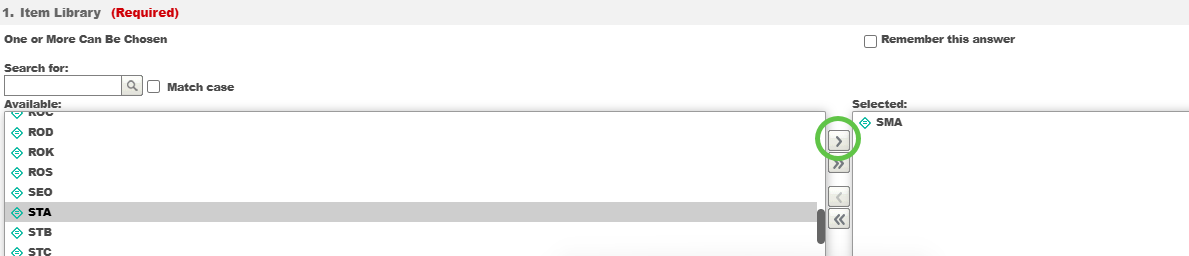
- In the prompts, click on your Library Code and use the single chevron arrow to move it to the Selectedcolumn.
- Input the last checkout dates, if desired.
- Click Run Report.
- Print or export the report as desired. More instructions can be found in the BCA video tutorials.
Item Group Editor Method
Note: This method is available for TECH and MANAGER logins only.
- In the Item Group Editor Wizard, input your Library Code in the Library field and DAMAGEDinto the Current Location field.
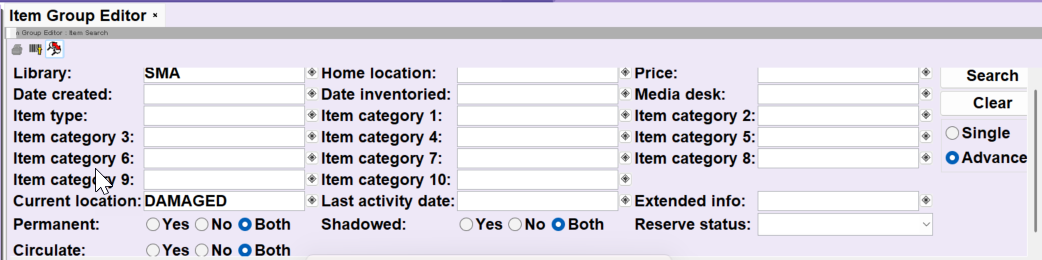
- Click Search.
- A list of DAMAGED items will be returned. You can print the results by selecting File > Print Screen.