There are three methods to retrieve a list of items currently in a missing status:
What to do: Each month, library staff are expected to look for missing items in the stacks. For any items found, scan the Item ID in the Checkin Wizard to remove the MISSING status.
Retention: After four months, any items remaining in MISSING status will be discarded automatically.
BLUEcloud Analytics Method
- Locate the MISSING REPORT in BLUEcloud Analytics. It is found in the BCA OHIO > Shared Reports > SEO REPORTS > MAINTENANCE folder.
- In the prompts, click on your Library Code and use the single chevron arrow to move it to the Selectedcolumn.

- Input the last checkout date, if necessary.
- Click Run Report.
- Print or export the report as desired. For detailed steps, see the BCA printing and exporting guide.
Item Group Editor Method
- From the TECH toolbar, click on the Item Group Editor wizard.
- Input your Library Code in the Library field.
- Enter MISSING into the Current Location field.
- Click Search.
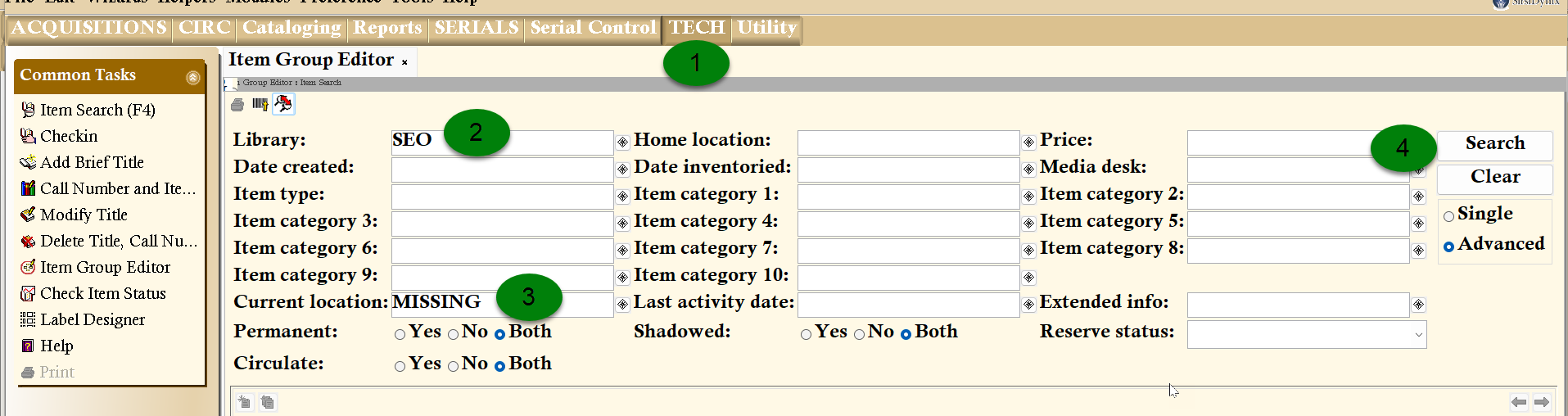
- A list of items will be returned. You can print the results by selecting File > Print Screen.
XYZMISSING User Method (WorkFlows)
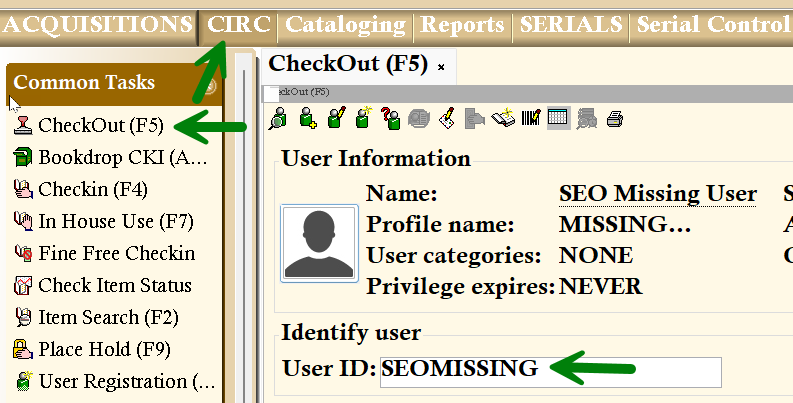
- In the CheckOut Wizard, enter XYZMISSINGinto the User ID field (where XYZ is your library code).
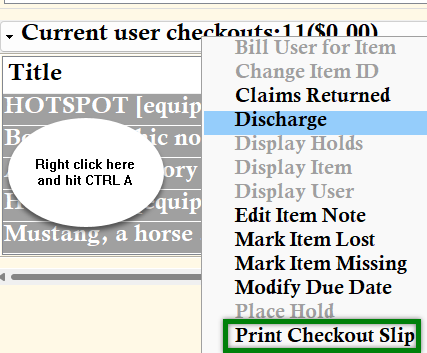
- To print this list, select all items, right-click, and select Print Checkout Slip.