
Use the User ID Manager to clean up patron records by moving old or unwanted identifiers.
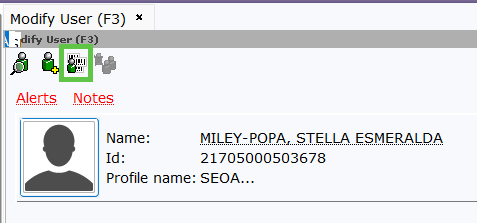
- From the CIRC toolbar, click the Modify User wizard.
- Click the User Search Helper to identify and select the patron you wish to modify.
- Click the User ID Manager Helper icon (located next to the User ID field).
- In the window that appears, move unwanted User IDs into the Inactive column. From there, you may move them to Discard.Important: Do not move the Primary User ID. This is the patron's current active barcode and must remain in the active column.
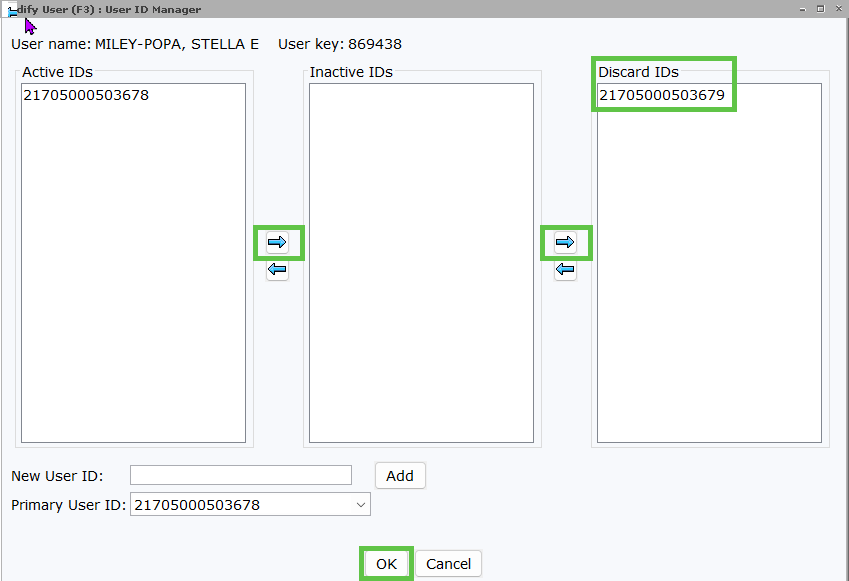
- Click OK when you have finished organizing the IDs.
- Click on the Extended Info tab on the user’s record.
- Locate the
PREV_IDline. Click on the entry you wish to remove, then click the Delete Row icon.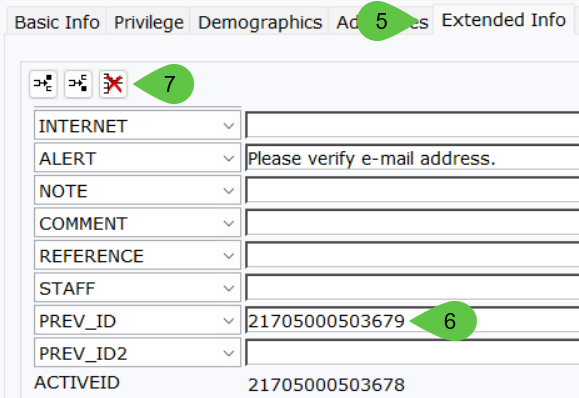
- Click Save to apply the changes.
Technical Support: If a patron has a
PREV_ID, PREV_ID2, INACTVID, or any other identifier that cannot be removed using the helper, please contact SEO at 1-877-552-4262 or submit a new ticket for manual removal.