Open navigation

Keeping a User from Being Sent to Debt Collection

Exempting a User from Debt Collection

Use the following steps to manually prevent a specific patron's account from being sent to a debt collection agency, regardless of their balance or overdue status.


  1. From the CIRC toolbar, click the Modify User wizard.
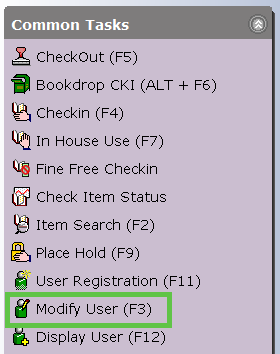
    WorkFlows CIRC toolbar highlighting the Modify User icon.
  2. Enter the User ID or search for the patron using the User Search helper.
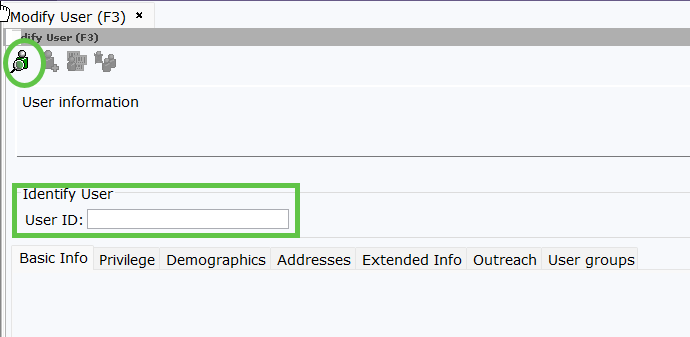
    Modify User search screen with the User ID field and search helper icon highlighted.
  3. Click the Extended Info tab.
  4. In the Note field, type: NODEBTCOLLECT
    (Note: Use all capital letters with no spaces.)
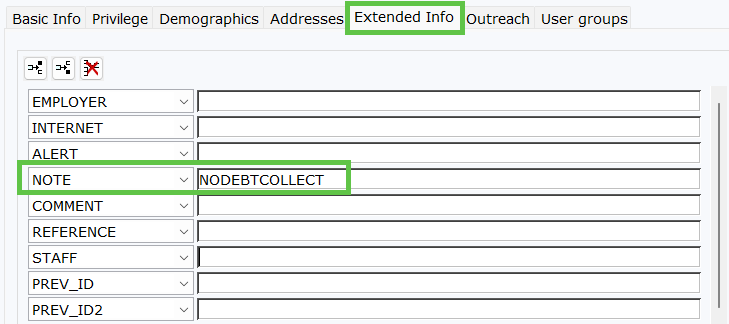
    Modify User screen showing the Extended Info tab and the text NODEBTCOLLECT entered into the Note field.
  5. Click Save to apply the changes to the user's account.
Verification: Once saved, the debt collection system will ignore this account during its regular automated runs.

Was this article helpful?

That’s Great!

Thank you for your feedback

Sorry! We couldn't be helpful

Thank you for your feedback

Let us know how can we improve this article!

Select at least one of the reasons
CAPTCHA verification is required.

Feedback sent

We appreciate your effort and will try to fix the article