
Implementing the HotKey Program for WorkFlows
The HotKey program is a utility used to quickly input "lib1" using the F10 key and close active Wizard windows using the ESC key.
- Download the HotKey.exe file attached to this article.
- To ensure the program runs every time Windows starts, you must place the HotKey.exe file into your computer's Startup directory.
- Locate your Startup folder:
- Right-click the Start button (or press Windows Key + X) and choose Run.
- In the Run box, type the command:
shell:startupand click OK.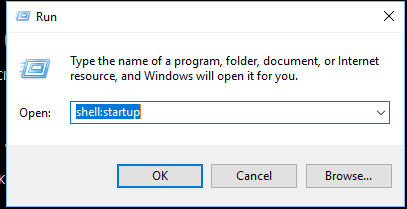
- Copy and paste the Hotkey.exe file into the folder that opens.
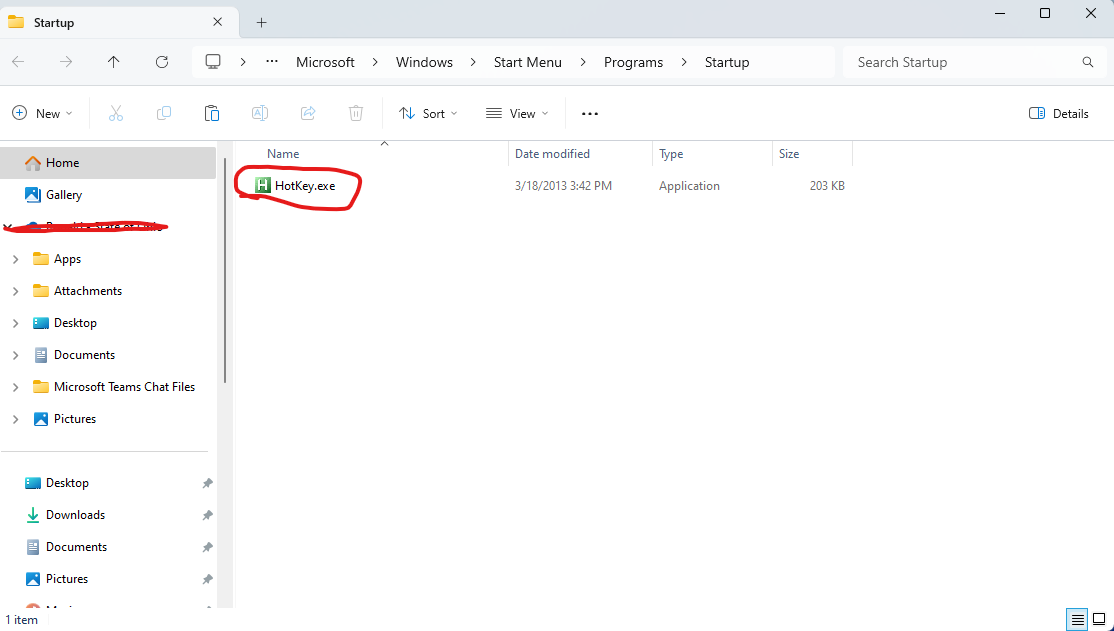
- Restart your computer. Alternatively, you can double-click Hotkey.exe to start it immediately. Once running, restart WorkFlows to begin using the new shortcuts.